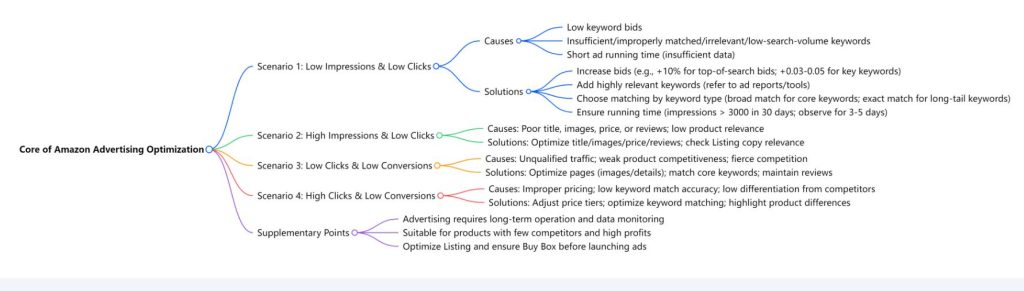

For Amazon sellers, in-store advertising is a core tool to boost product exposure and sales. However, many struggle with the issue of “spending money without results” after launching ads. In fact, poor advertising performance can often be traced to specific causes through key metrics—unusual combinations of impressions, clicks, and conversions hold the clues to targeted optimization.
1. Low Impressions & Low Clicks: First, Solve the “Visibility” Problem
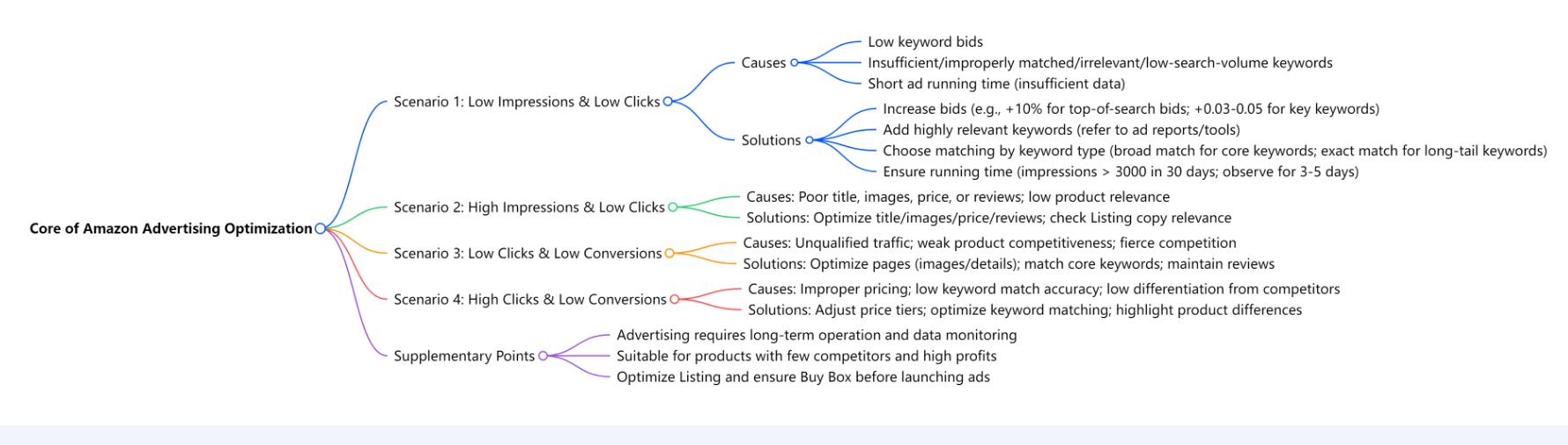
If both impressions and clicks are low after launching an ad, the root cause is essentially that “the product isn’t getting in front of target users.” Here are the core reasons and solutions:
1. Uncompetitive bids? Break through with step-by-step price increases
Low keyword bids are like choosing a corner booth at a popular exhibition—naturally, no one notices. Start by increasing the bid percentage for top-of-search results by 10% and observe for 3–5 days. If there’s no improvement, add another 10%. For keywords that need priority exposure, adjust bids by 0.03–0.05 each time. This avoids sudden cost spikes while gradually securing better positions.
2. Too few keywords? Expand with precision to fill traffic gaps
A small number of keywords limits coverage of search scenarios. Expand relevant keywords by mining actual user search terms from ad reports, using keyword tools, or adopting an “A-Z keyword method” (listing terms from core product attributes to usage scenarios). However, more isn’t always better—prioritize keywords with high search volume and strong product relevance. Cold keywords are like remote roads; no matter how wide, no one travels them.
3. Mismatched keyword matching? Choose strategies based on keyword type
Matching methods directly affect impression efficiency: Core keywords (≤3 words, e.g., “wireless Bluetooth headphones”) can use broad, phrase, and exact matches to reach more potential users. Long-tail keywords (>3 words, e.g., “12-hour battery wireless Bluetooth headphones”) are better suited for exact match to avoid scattered traffic.
4. Running time too short? Give data a “growth cycle”
Advertising isn’t an “instant result” tool. Judging performance after just 3–5 days is like expecting fruit right after planting a seed. Aim for a baseline of “over 3,000 impressions in 30 days.” After increasing bids for low-impression keywords, observe for 3–5 days, focusing on whether metrics like impressions and click-through rates improve.
If data remains abnormal, combine manual and automatic matching ads: Automatic matching helps “explore” potential keywords, while manual matching focuses on core terms to control traffic precisely. This combination captures comprehensive, valid data.
2. High Impressions & Low Clicks: Make “Passersby” Want to Stop
High impressions mean keywords are correctly chosen (they’re all high-search terms), but low clicks indicate the “ad’s facade” lacks appeal. Focus on these four core elements:
1. Titles: Explain “why users need it” in one sentence
Titles should include core keywords and highlight key product advantages (e.g., “Wireless Bluetooth Headphones – Noise Cancellation, Long Battery Life, Compatible with Android & iOS”). Avoid irrelevant word users only glance at titles for 2 seconds; vague descriptions will make them scroll past.
2. Images: Convey “value” visually
Main images should clearly show the product and its usage scenario, while secondary images add details (e.g., material, size, effects) with a consistent style. For home goods, a main image of the product in a living room (rather than just the product alone) creates more resonance.
3. Pricing: Align with user expectations
For high-search keywords, users quickly compare prices with similar products. If your price is significantly higher than competitors without differentiation, clicks will suffer. Reference the pricing range of top-selling similar products, or use “bundle discounts” or “new user offers” to enhance perceived value.
4. Reviews: Build trust to reduce hesitation
If impressions are high but clicks low, check review ratings—products with <4 stars easily raise user concerns. Gradually improve ratings by following up on orders and inviting genuine user reviews. Respond promptly to negative reviews to show post-sales commitment.
Additionally, check the relevance of Listing copy to keywords: If users search for “outdoor thermos” but your Listing focuses on “office use,” even with exposure, it will be ignored as “misaligned.”
3. Low Clicks & Low Conversions: Optimize the Loop from “Traffic” to “Sales”
Low clicks and conversions may stem from “unqualified traffic” or “unconvincing products.” Break through in three areas:
1. Sharpen traffic quality: Target “real demand”
If users click but find “not what they want,” keyword matching is likely flawed. For example, selling “kids’ thermoses” with broad match for “thermos” may attract users looking for adult versions. Narrow keyword scope and prioritize exact match to target the right audience.
2. Strengthen product appeal: Optimize page details
Detail pages should be clear: Use bullet points for key selling points (≤20 words each) instead of long paragraphs. Highlight critical info (e.g., “304 stainless steel” or “12-hour insulation”) with bold text or icons. For new products, add “usage guides” or “FAQs” to lower decision barriers.
3. Compete effectively: Highlight “differentiated advantages”
In crowded categories, clarify “what makes you different” in Listings. If competitors focus on “low prices,” emphasize “upgraded materials”; if they highlight “basic functions,” stress “added services” (e.g., “free bottle brush included”). In fierce competition, “uniqueness” resonates more than “affordability.”
4. High Clicks & Low Conversions: Make “Visitors” Want to Buy
High clicks but low conversions mean “users can’t find a reason to purchase.” Adjust in three dimensions:
1. Price tiering: Cover more needs
Pricing only for “high-end users” may miss mid-range customers. Offer “basic + premium versions”: The basic version targets budget-conscious users with value; the premium version adds features (e.g., “thermos with tea strainer”) to meet niche needs and expand the target audience.
2. Keyword “precision targeting”: Avoid “accidental clicks”
High clicks but low conversions may result from overly broad keywords. For example, selling “professional photography tripods” with broad match for “tripod” attracts users looking for “phone selfie tripods”—traffic that looks good but rarely converts. Switch to precise terms like “professional photography tripod – 10kg load capacity” to filter invalid clicks.
3. Highlight “competitive differentiation”: Give users a “reason to choose you”
Add a “comparison table” to detail pages, directly contrasting specs with top competitors (e.g., “30% lighter and 20% higher load capacity than Brand X”). Or emphasize “exclusive advantages” (e.g., “Amazon Prime delivery – next-day arrival”). When users hesitate between products, clear differentiation speeds up decisions.
5. “Prerequisites and Boundaries” of Ad Launch
Not all products suit advertising—those with few competitors and high profits work best: Even 1 sale from 50 clicks can cover costs. For low-margin products with many competitors, blind advertising may lead to “more sales, more losses.”
Prepare thoroughly before launching: Optimize Listings (titles, descriptions, images, etc.) to ensure core keywords are properly placed; secure the “Buy Box”—without it, even interested users will struggle to purchase.
Finally, remember: Advertising is an “amplifier.” It makes good products more popular but can’t save inherently uncompetitive ones. If long-term optimization fails, reassess whether the product truly meets market demand—sometimes, switching products works better than obsessing over ads.
The core of Amazon advertising isn’t “blind spending” but “finding patterns in data.” By identifying issues in unusual impressions, clicks, and conversions, and optimizing targeted, you ensure every advertising dollar is spent effectively.