
Hey fellow Amazon sellers! Have you been panicking lately when you open your backend and see your sales dropping?
Don’t stress! Today, let’s talk about something practical—how to figure out the reasons for falling sales step by step, plus solutions you can use right away. These are all actionable tips, so feel free to save this if you can’t remember everything now!
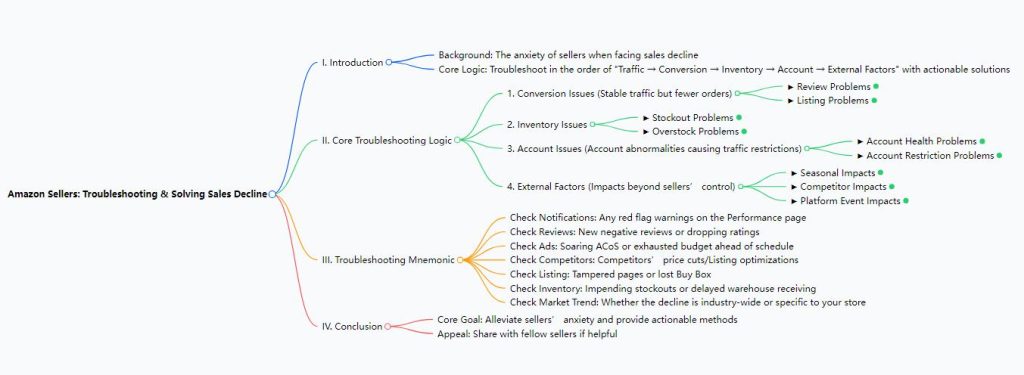
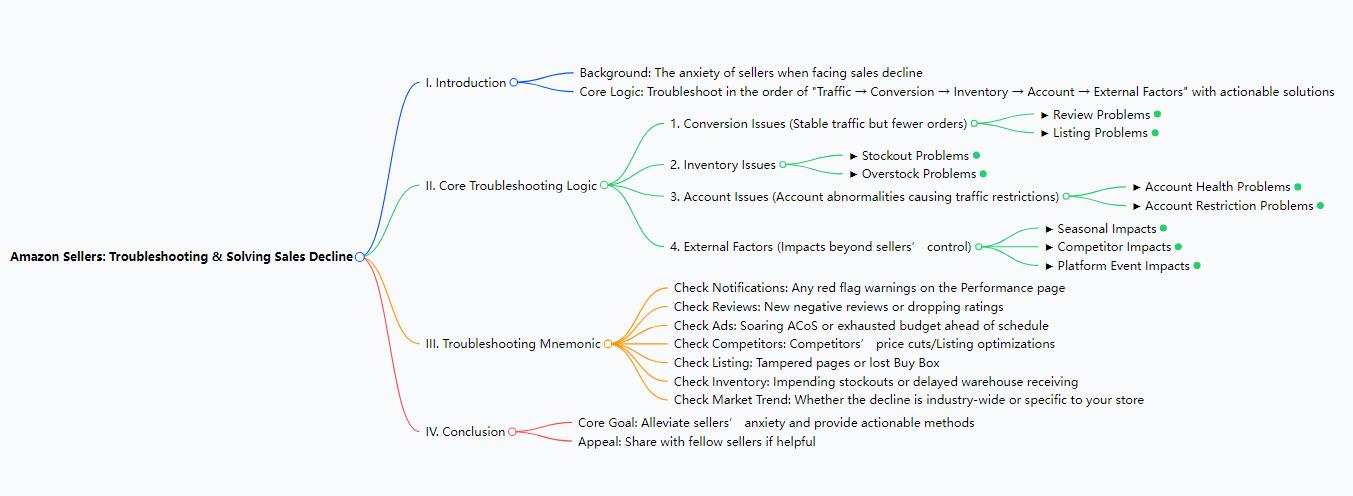
The core logic is actually simple: troubleshoot in the order of traffic → conversion → inventory → account → external factors. Focus on specific issues at each step, and let’s break them down one by one.
First: Conversion Issues
If your traffic stays roughly the same but orders keep dropping, focus on two key areas: reviews and Listings.
1. Reviews
Go to your backend: Performance → Buyer Reviews. Pay close attention to two things:
- Are there new 1- or 2-star reviews in the last 3–7 days?
- Has your average rating dropped below 4 stars (e.g., from 4.5 stars)?
A drop in ratings directly hurts customer trust—no one wants to buy from a low-rated listing.
Possible causes: Poor product quality, slow shipping, or even malicious reviews from competitors.
Solutions:
- Fix the root cause first: If quality is the issue, ask your supplier for a new batch; if shipping is slow, switch to a faster logistics channel.
- Respond to negative reviews within 24 hours. For example, if a customer says, “The cup leaks,” reply: “We take your feedback very seriously and have arranged to send you a new cup body. Please send us your address via private message, and we’ll prioritize your shipment.” Other customers will see you’re reliable.
- Send in-site messages to past buyers: Ask how they like the product and gently encourage positive reviews.
2. Listings
Many customers scroll past your listing simply because it’s not engaging enough. Start with these two parts:
Main Images
Your main image is the first impression—compare it to competitors’! If they show a “foldable cup fitting in a pocket” but you only show the cup itself, your click-through rate (CTR) will suffer.
Check your Business Reports for your main image CTR. If it’s lower than the industry average (e.g., 1% vs. the industry’s 2%), optimize it:
- Use a plain white background (Amazon’s preference).
- Highlight product benefits—e.g., show “before/after folding” for a foldable cup.
- Add a usage scenario in the second image (e.g., “the cup in a backpack”) to help customers imagine using it.
- Ensure images are high-definition, with no watermarks or text.
5-Point Descriptions
Don’t just list features (e.g., “200ml silicone material”)—focus on benefits customers care about. For example:
- Instead of “200ml silicone material,” say: “200ml capacity fits easily in bags—perfect for on-the-go! Silicone is shatterproof, so it’s safe for kids.”
How to do this well?
- Analyze 100 negative reviews from competitors to find pain points (e.g., “smells bad,” “hard to clean”).
- Address those pain points in your 5-point description—and tie each point to a benefit.
Next: Inventory Issues
Inventory problems usually fall into two categories: stockouts and overstock.
1. Stockouts
Check:
- Backend: Inventory → Manage Inventory (is your “available inventory” at 0?).
- Frontend: Does your listing show “Temporarily Out of Stock”?
Possible causes: Delayed restocking, slow logistics for restocks, or slow receiving at Amazon’s warehouses.
Solutions:
- Urgently restock via SF Express or air freight (don’t wait for sea freight—it’s too slow).
- If stock arrives but isn’t listed, go to Inventory → Inbound Plans to follow up with Amazon.
- Keep your ranking from dropping during stockouts: Run low-budget ads, and enable pre-orders if possible (let customers order now, ship later).
2. Overstock
First, calculate your inventory turnover rate: (Sales in the last 30 days) ÷ (Current inventory). A rate below 30% means overstock. You can also check Data Reports for “long-term storage fees” (Amazon charges fees for inventory stored over 6 months).
Possible causes: Overordering for peak seasons, outdated products, or poor sales due to past negative reviews.
Solutions:
- Clear stock quickly: Use off-site platforms like Slickdeals to drive traffic.
- If you can’t sell it: Go to Inventory → Manage Inventory to create a removal order (choose to destroy or donate the stock)—it’s better than paying unnecessary storage fees.
Then: Account Issues
A troubled account can lead to traffic restrictions—don’t ignore this!
1. Account Health
Check your backend: Performance → Account Health. Is it marked “Healthy”? Are there any red warnings?
Key metrics to watch:
- Order Defect Rate (ODR): If it exceeds 1%, Amazon may restrict your account.
- Order Cancellation Rate: If it exceeds 2.5%, it hurts your visibility.
Possible causes: Too many negative reviews, delayed handling of Amazon A-to-z Guarantee claims, or forced cancellations due to stockouts.
Solutions:
- Handle negative reviews and A-to-z claims within 24 hours. For A-to-z claims, submit evidence (e.g., tracking numbers, delivery confirmations) quickly.
- Restock fast to reduce order cancellations.
- If you get a warning for poor metrics: Follow Amazon’s instructions to submit an appeal plan (e.g., “I will check inventory daily for the next 30 days and respond to customer messages within 12 hours”).
2. Account Restrictions
If your traffic drops sharply and ads get no exposure (even with normal spending), your account may be restricted.
Possible causes: Rule violations (e.g., keyword stuffing), account association, or selling prohibited products.
Solutions:
- Contact Amazon’s “Account Health Team” via Help → Contact Us to clarify the reason.
- Stop any rule-breaking behavior immediately.
- If it’s a mistake: Submit evidence to appeal (e.g., proof of legitimate sourcing for “prohibited” products).
Finally: External Factors
These aren’t your fault, but they still affect sales.
1. Seasonality
Examples:
- Swimwear sells well June–August, but drops after September.
- Christmas decorations boom November–December, then crash in January.
How to check:
- Look at last year’s sales data for the same period.
- Search your product keywords on Google Trends to see seasonal trends.
Solutions:
- Clear stock 1–2 months before the peak season ends.
- Switch to seasonal products in off-seasons (e.g., sell heaters in winter, fans in summer) to keep sales steady year-round.
2. Competitor Actions
Competitors can steal your sales by:
- Increasing sales (e.g., jumping from 10 to 30 orders/day).
- Running promotions (e.g., Lightning Deals) or cutting prices by \(5–\)10.
- Optimizing their Listings or A+ Content.
How to check:
- Use tools to track competitors’ sales in the last 7 days.
- Check their frontend listings for new promotions or optimized images.
Solutions:
- Don’t just match their price cuts (you’ll lose profit!). Instead, highlight your unique benefits (e.g., “12-hour heat retention” if competitors’ products don’t keep drinks warm).
- Learn from their strengths: If their main image update boosted sales, use similar ideas to optimize yours.
3. Platform Events
After big events like Prime Day or Black Friday, sales often drop—customers already bought what they need!
Solutions:
- Run small-scale promotions to encourage repeat buys.
- Launch new products: Add links to new products on your existing listings to drive traffic.
A Quick Mnemonic for Troubleshooting
Next time sales drop, ask yourself these 7 questions:
- Check notifications: Any red flags in the Performance section?
- Check reviews: New negative reviews or a dropping rating?
- Check ads: Is ACoS spiking? Did your budget run out early?
- Check competitors: Did they cut prices or optimize their Listings?
- Check your Listing: Was it tampered with? Did you lose the Buy Box?
- Check inventory: Are you about to stock out? Is receiving delayed?
- Check the market: Is the whole industry dropping, or just you?
This will help you find the cause fast!
That’s all for today’s tips. I hope this eases the anxiety of anyone dealing with falling sales. If you found this helpful, don’t forget to share it with fellow Amazon sellers. See you next time!